



Readers and writers alike, happy blogging! If you publish your blog from your phone, I hold you in the highest esteem — you’re one heck of a dedicated blogger!
As for me, I have the luxury of blogging from a desktop computer, a 2013 iMac. Which is to say that it’s super easy for me to stick with WordPress Classic editor because yes, I most definitely prefer it. In a recent blogging class I attended, even the teacher recommended a workaround for students to use Classic! Given how many folks read blogs from their phones, Guttenberg’s block-fanciness is worse than useless. When I read anything on my 5s iPhone, the simpler the layout, the better.
This is how I use WordPress Classic Editor on my desktop: in the admin page, I pull up a list of my posts. Then I hover my mouse pointer over a post title. Below that, a selection appears, which includes the choice to use Classic Editor.
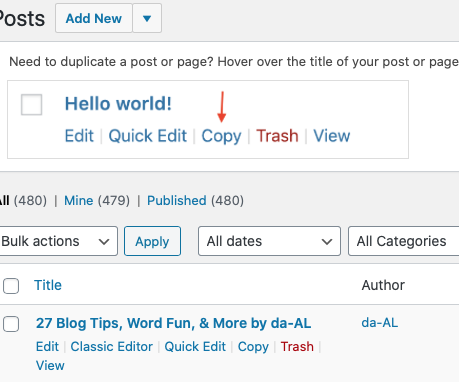 See how on the bottom left is the option to use Classic Editor? Using a desktop computer, just hover your mouse under your blog post title on your admin page.
If I wanted to write a post from my iPad, WordPress offers an abbreviated version Classic. To switch over to it, tap on the three dots in the screen’s upper right corner.
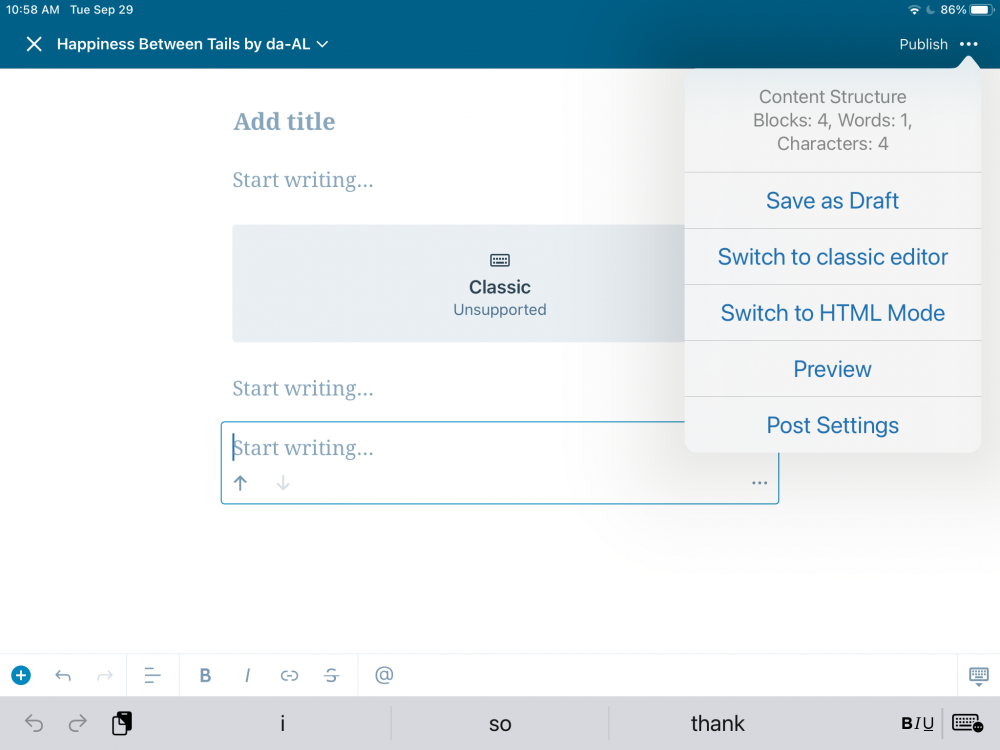 Clicking on the 3 dots in the upper right corner of your tablet gives you the option to use Classic.
Using an iPhone works similar to an iPad.
 Here’s when I clicked on the 3 dots in the upper right corner of my phone.
For a more detailed explanation, but that doesn’t include the way I described that I do it from my desktop computer, WordPress has this link.
In another post of my blogging tips, the mention of WordPress’ newer editing system got people talking, so here I’m offering you a chance to comment below. Vent? Praise? Either way, when I let WordPress know about this post with your comments on it, maybe they’ll actually listen to us.
Again wishing you joy — and ease — whether you’re blogging, reading, writing — or are you traveling online?
How do you deal with computer annoyances?
Discover more from Happiness Between Tales (and Tails) by da-AL
Subscribe to get the latest posts sent to your email.


I’ve tried the block editor. We fought. He beat me.
Well, the first round he did. Then I changed my site back to the classic editor which I am still using to date 😀
LikeLiked by 3 people
I’m still struggling with the block editor. Haven’t gone back to classic yet. Don’t ask me why. If I was a graphic designer, I might have a real reason to stay with the block. Clearly, I’m not a designer.
LikeLiked by 3 people
I admire your relentlessness, David. I hope you’ll tackle the block editor someday soon 👍 And if not… know that you’re not alone in this.
And that wisdom comes from admitting to our mistakes 😉😉
LikeLiked by 2 people
when I first started blogging, I’d take pains to wrap text around my pix just so, etc — but eventually found that truly the best posts were the simplest — that’s with my assumption that most people read blogs on their phones
LikeLiked by 2 people
I think there is no doubt people read blogs mostly on their phones. I like desktops and laptops. That makes me old fashioned. Also, when I try to like a post, it doesn’t work on my desktop or laptop. Only my phone. Have you had the same experience? It is frustrating.
LikeLiked by 1 person
pow! pow! pow! take that, classic! lolol btw, whatever you do, you have a lovely site that I recommend all to visit 🙂
LikeLiked by 1 person
I think I’ve only once attempted to do anything WP post-related on my iPad – I’ve always been a laptop girl! Your tips, are sure to help folks, especially that use WP editor across different devices, because I’m seen so many comments now from people saying they’re confused by the new Block editor and hate it! xx
LikeLiked by 4 people
sounds like you’re cool with classic – glad for you 🙂
LikeLiked by 1 person
I dont know how I feel. I spent most of the day wrestling with the Block editor. There’s a lot to like but navigating on a Chrome book is challenge.
LikeLiked by 3 people
wishing you perseverance & success, Antoinette 🙂
LikeLike
da-AL, Thank you for the information on how to get Classic Editor. ❤ My website is four years old, so it was originally done in Classic. Some Classic pages remain, but most pages now are in Block Editor. I found the change frustrating, but have made my peace with it. I like Classic because you have more control, but Block is convenient. My blog, which was added about four months ago, is all Block Editor.
I hope all is well with you. Cheryl
LikeLiked by 3 people
am impressed, Cheryl! yes, fortunately all well with me & mine — hope same for you & yours ❤
LikeLike
Thank you for sharing!… I do not use a phone, just my computer… at the moment don’t have the time to research Editor, perhaps when the winter doldrums arrive, I can… I use Windows Publisher and work with Classic most of the time… as Mark van Doren said; “Any piece of knowledge I acquire today has a value at this moment exactly proportioned to my skill to deal with it. Tomorrow, when I know more, I will recall that piece of knowledge and use it better. “….. 🙂
Until we meet again..
May love and laughter light your days,
and warm your heart and home.
May good and faithful friends be yours,
wherever you may roam.
May peace and plenty bless your world
with joy that long endures.
May all life’s passing seasons
bring the best to you and yours!
(Irish Saying)
LikeLiked by 2 people