



Readers and writers alike, happy blogging! If you publish your blog from your phone, I hold you in the highest esteem — you’re one heck of a dedicated blogger!
As for me, I have the luxury of blogging from a desktop computer, a 2013 iMac. Which is to say that it’s super easy for me to stick with WordPress Classic editor because yes, I most definitely prefer it. In a recent blogging class I attended, even the teacher recommended a workaround for students to use Classic! Given how many folks read blogs from their phones, Guttenberg’s block-fanciness is worse than useless. When I read anything on my 5s iPhone, the simpler the layout, the better.
This is how I use WordPress Classic Editor on my desktop: in the admin page, I pull up a list of my posts. Then I hover my mouse pointer over a post title. Below that, a selection appears, which includes the choice to use Classic Editor.
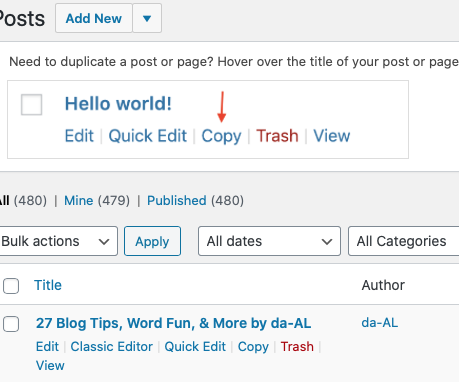 See how on the bottom left is the option to use Classic Editor? Using a desktop computer, just hover your mouse under your blog post title on your admin page.
If I wanted to write a post from my iPad, WordPress offers an abbreviated version Classic. To switch over to it, tap on the three dots in the screen’s upper right corner.
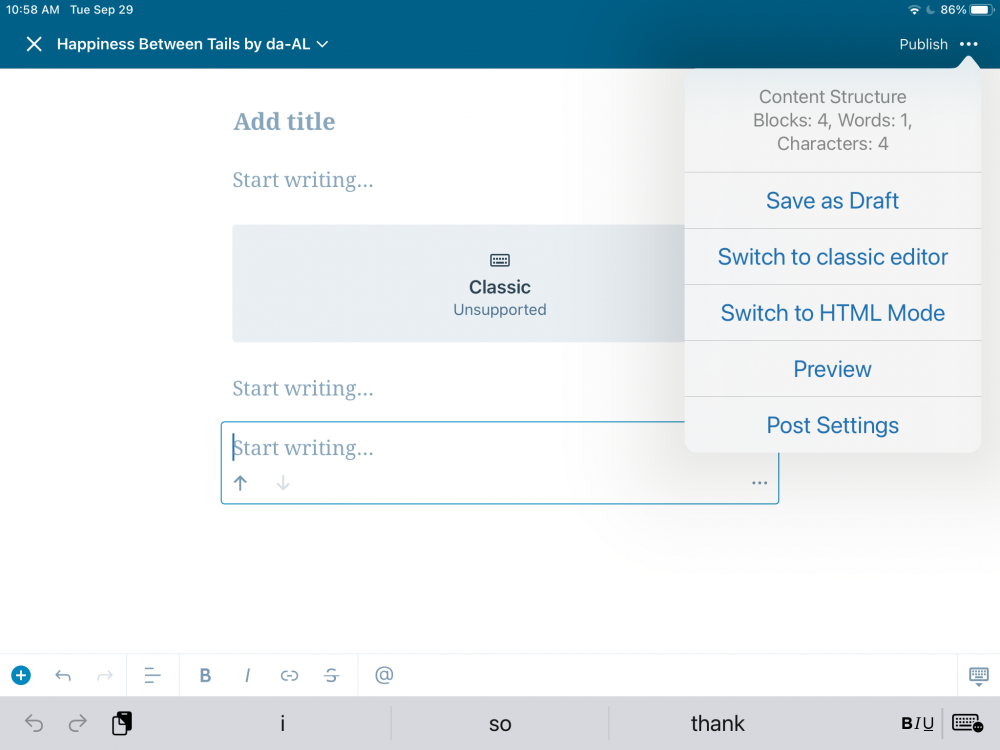 Clicking on the 3 dots in the upper right corner of your tablet gives you the option to use Classic.
Using an iPhone works similar to an iPad.
 Here’s when I clicked on the 3 dots in the upper right corner of my phone.
For a more detailed explanation, but that doesn’t include the way I described that I do it from my desktop computer, WordPress has this link.
In another post of my blogging tips, the mention of WordPress’ newer editing system got people talking, so here I’m offering you a chance to comment below. Vent? Praise? Either way, when I let WordPress know about this post with your comments on it, maybe they’ll actually listen to us.
Again wishing you joy — and ease — whether you’re blogging, reading, writing — or are you traveling online?
How do you deal with computer annoyances?
Discover more from Happiness Between Tales (and Tails) by da-AL
Subscribe to get the latest posts sent to your email.


I use my phone most often for writing and editing on the go. I love that I can switch to between classic and block editor.I use classic more because I find it easier to use. Thanks for sharing.
LikeLiked by 3 people
you are amazing, Florence! I dunno if I’d have patience enough to blog on a tiny screen…
LikeLiked by 1 person
I got used to it with time 😃. Still prefer the big screen but couldn’t carry my laptop along all the time.
LikeLiked by 1 person
Thank you great info. I havent posted as much as I find block too complicated, being dislexic doesnt help with all the extra detail on block it just becomes a jumbled mess takes me ages just to find 1 thing & i cant even spell check as goodness knows where that is now. aaaagggghhhh. Thanks for the vent, I feel better now, hahaha. Have a awesome rest of the week.
LikeLiked by 2 people
you too — your blog is lovely! everyone needs to visit it! 🙂
LikeLiked by 1 person
Very poetic informative!
LikeLiked by 2 people
🙂
LikeLike
yes
LikeLiked by 1 person
Hi, da-Al. Thanks so much for sharing… I will continue to use Classic and am grateful that you’ve given an apt and easy way to do that for everyone. 🙂 Grateful and sharing!
LikeLiked by 2 people
good luck with your blogging, Bette – I recommend everyone to visit your lovely site 🙂
LikeLiked by 1 person
Thanks so much for your support, da-Al! ❤ Have a blessed and beautiful day….
LikeLiked by 1 person
❤
LikeLike
I agree. Haven’t found a reason to fool around with whatever the block editor has to offer beyond what I did on the classic editor. Keep it simple stupid (The KISS Principle).
LikeLiked by 5 people
well said, David 🙂
LikeLiked by 1 person